Pages

Showing posts with label iphone. Show all posts

Wednesday, 24 January 2018

Instagram is testing Direct, a messaging app that replaces the current inbox

Instagram is testing a standalone app for private messages called Direct, a first step toward possibly toward removing messaging features from the core app. Direct, which opens to the camera in the same way Snapchat does, will become available on Android and iOS today in six countries: Chile, Israel, Italy, Portugal, Turkey, and Uruguay. If you install Direct, the inbox disappears from the Instagram app and can only be accessed in the messaging app. If Instagram introduces Direct globally — it currently has no timeline for doing so — the move could give parent company Facebook a third popular messaging tool alongside Messenger and WhatsApp.
                                                         CLICK TO DOWNLOAD  


Although it is officially only a test, Instagram’s rationale for building Direct app is that private messaging can never be a best-in-class experience when it lives inside an app meant for broadcasting publicly. “We want Instagram to be a place for all of your moments, and private sharing with close friends is an important part of that,” Hemal Shah, an Instagram product manager, told me. “Direct has grown within Instagram over the past four years, but we can make it even better if it stands on its own. We can push the boundaries to create the fastest and most creative space for private sharing when Direct is a camera-first, standalone app.”
If that sounds familiar, it’s because Facebook has undertake a transition like this before. In 2014, the company shut off messaging inside the flagship app, forcing users to download Messenger. “On mobile, each app can only focus on doing one thing well,” CEO Mark Zuckerberg said at the time. “Asking folks to install another app is a short term painful thing, but if we wanted to focus on serving this [use case] well, we had to build a dedicated and focused experience.”
Direct was built according to similar logic. While direct messaging was originally an afterthought in Instagram, after multiple redesigns it had accumulated 375 million monthly users by April of this year, the company says. Its rise has coincided with the growth of Instagram stories, which encourage users to fire back quick replies to friends’ messages by adding a “send message” box underneath each one.
Now Instagram will see whether its tools for private messages can thrive on their own. There is reason to believe that they will: messaging apps have more aggregate users than social networks do, and some have speculated that growing cultural tensions are pushing more conversations from public forums to private groups. If messaging becomes a large, pseudo-independent pillar of Instagram, it could further entrench the app in the lives of its users while opening up significant new business opportunities.
Source:- The Verge 

Friday, 9 December 2016

'super mario run' a new game on ios

Mario’s accomplished a lot in the three and a half decades he’s spent in the public spotlight. He’s been a plumber, a soldier, a doctor, refereed basketball and tennis, played baseball and raced cars, made toys and worked at a brewery. He’s lived through every Nintendo console and watched generations of competitors rise and fall.

But in spite of one of the most impressive resumes in all of video gamedom, his arrival on iOS was anything but smooth. Over the past decade, the company made it sufficiently clear that mobile was not and would never be the right play for Nintendo.
You don’t have to dig too far to find a rich vein of quotes expressing that viewpoint, but here’s one from 2011 that does the job pretty well:
Having a hardware development team in-house is a major strength. It’s the duty of management to make use of those strengths. It’s probably the correct decision in the sense that the moment we started to release games on smartphones, we’d make profits. However, I believe my responsibility is not to short-term profits, but to Nintendo’s mid- and long-term competitive strength.
But industries and buying habits change, and in order to survive, companies must shift accordingly. For Nintendo, that meant a reappraisal of how the gaming giant approached mobile gaming.
“We have reshaped our overall business mission and key strategies that are driving it,” Nintendo of American President Reggie Fils-Aimé told TechCrunch in a sit-down interview ahead of the launch of the company’s latest mobile offering. “Our business mission is to make people smile through the use of our IP.”
While Nintendo hasn’t shied away from its long-standing dedication to the marriage between platform and game, the opportunity presented by mobile was ultimately too strong to ignore, albeit from a sheer fiscal standpoint and from the point of view of a company looking to reach a new generation of users and underserved parts of the globe with the most valuable intellectual property in the business.

Level One

It wasn’t exactly kicking and screaming, but no one can accuse Nintendo of launching headlong into a vibrant new format. In March of this year, the company took its first stab at the space in the form of Miitomo, a sort of social network built around Wii-like avatars and tied to the company’s My Nintendo program. The app started off strong, but a few months later, engagement had dropped off sharply.  It was a strange choice for Nintendo’s long-awaited mobile arrival. It wasn’t a game, really, and it didn’t leverage any of the aforementioned IP. No Zelda, no Mario, not even a Samus or Kid Icarus.
And then Pokémon GO happened. The Niantic-developed app was a veritable phenomenon, a perfect fusion of Nintendo charm and mobile technology, utilizing geolocation and camera-based AR technologies in a way that simply couldn’t exist on other platforms. And in the process, it created the sort of gaming event that only comes a few times in a generation. It also managed to reignite interest in one of the company’s top properties.
“Since the launch of Pokémon GO this summer, we’ve seen Nintendo 3DS have year over year growth,” says Fils-Aimé. “We’ve seen the unprecedented launch of Pokémon Sun and Moon. For us what this signals is that, if we get millions or billions of consumers to interact with our IP, the halo effect that it can have across all of our business lines is tremendous. That’s a fundamentally different strategy trajectory that we were on 10, 15 years ago. “

Power-up

Next up is Super Mario Run. Set for a release this month exclusively on iOS, the title marks the arrival of the one Nintendo property with even more instant cache than Pokémon.
The game plays to the franchise’s strengths, built around a familiar sidescrolling format that maintains a lot of Super Mario Bros.’s familiar elements, from goombas and question-mark boxes to Bowser castles and ghosts, applying them to a slightly tweaked formula designed to play with a single hand in portrait mode, so users can play while hanging onto a subway strap.
The camera advances automatically and Mario runs along with it. And, surprisingly, automatically leaps over enemies — which admittedly takes some getting used to after decades spent manually jumping on top of Koopa Troopas. The skill lies in jumping over games, grabbing power ups and collecting coins — the latter of which provides users different experiences of the same level when enough of the special pink versions are attained.
“Our developers approach game development uniquely to each specific experience and game,” Fils-Aimé explains. “Super Mario Run is a game our team wanted to make accessible to everyone — five to 95. All you have to do is tap on the screen with one finger. But the ability to progress, the ability to capture all the coins, the ability to build your kingdom — that takes some mastery.”
Anyone who’s spent any time in the Mushroom Kingdom will immediately feel at home among the pipes, and the Nintendo team, led by Mario’s legendary creator Shigeru Miyamoto, has done a fine job playing to the technology’s strengths, with a bright and shiny take of the portly plumber, paired with a souped-up version of the familiar soundtrack. All of that is set to newly designed levels in 24 worlds that echo but don’t directly duplicate the original.
“Mr. Miyamoto and his team deserve a lot of credit for what they’ve been able to do,” Fils-Aimé continues. “Nintendo has experienced developing a wide range of different games for a wide range of different controls. Everything from the original D-Pad to the original motion controller. What we had to do was really think about how you build a compelling experience that you can literally play with one finger, by touching a screen.”

On the run

The game’s appeal is, in no small part, due to its simplicity. As with the recently released NES Classic, it plays to Nintendo’s greatest strength these days: putting a new spin on the old classics. But that all-too-familiar approach has already made the $10 price point difficult for some otherwise enthusiastic gamers to swallow.
While it might be less than the cost of a movie, $10 might as well be $100 for many in mobile app land — particularly in the wake of the free-to-download Pokémon GO. But between a free three-level trial and potential replay value, Fils-Aimé is confident that the company has hit the right price point.
“Every game we develop — whether it’s for the home console or handheld — we ask ourselves what’s the right value for the offering,” he explains. “Look at Super Mario Run: 24 different worlds, three different modes, the on-going replayability for $9.99 here in the U.S. That’s a tremendous value, and we think in the end the consumer is going to respond accordingly, especially when they can sample a lot of the game for free.”

Back to basics

Super Mario Run doesn’t capitalize on the iPhone’s strengths in nearly as innovative a fashion as Pokémon GO, but it does a good job playing to its relative weaknesses as a gaming system, porting Mario to a world devoid of custom controllers and massive screen real estate.
Like Flappy Bird before it, it’s a game that can completed almost entirely with a single repetitive motion: the tap. And it also goes even more vertical than the first generation of platformers, with some parkour-style bounds off the sides of walls that help Mario advance to the next level, grab some elusive coinage and get out of some pretty tight scrapes.
And as the NES Classic’s seemingly unmeetable demand has confirmed, the nostalgia factor alone will be more than enough to get most gamers through the door. I was only able to play through two levels in my demo, but the appeal is clear. It’s equal parts fun and frustrating the way Mario has always been.
I’m not sure the purely aesthetic between-level world building or the opportunity to replay the same level in different configurations has quite the appeal Nintendo is banking on, but 24 world’s worth of gameplay should keep most casual gamers busy for a while to come. And hey, on a platform where Fruit Ninja and Angry Birds are considered classics, perhaps there’s something to be said for repetition.Playing through the game, it’s almost hard to recall the company’s initial reservations around a mobile Mario. With Miyamoto and a team of world-class developers who turned the game around in about a year, it’s easy to image where Nintendo’s mobile division would be if the company had leapt in a few years earlier, rather than stubbornly refusing to develop for someone else’s hardware. But Fils-Aimé insists that the company has no reservations about entering mobile when it did.
“It really was important to be thoughtful around how this business opportunity would look in our broader business scheme,” he explains. “Being thoughtful around how we go about it and how we leverage it across all parts of our business. We’ve said for years that we could make this type of content, but for us it really was thinking about how it fits in the broader ecosystem of driving our IP. We believe we’ve found that approach. “
A week ahead of the release Nintendo’s first true smartphone game, Super Mario Run, we had a chance to spend a half-hour with the portable platformer. How does it feel? Surprisingly like a classic Mario game.
Super Mario Run strips the core of a Mario game to its very basics. Unlike classic Mario games, in which you control the forward and backward movement of Mario, this game is an automatic runner, which means that Mario will run on his own. You control when he jumps.A light tap will cause a quick hop, while a longer press will send the mustachioed plumber soaring through the air. Moves can be combined in a number of ways, sending Mario vaulting over enemies, catapulting to collect coins, or leaping to hard-to-reach places.
Despite the streamlined controls, Super Mario Run still manages to feature what you’d expect from the series. You can still wall jump, stomp goombas, and collect coins and power-ups. Many of Mario’s moves have been automated: if you run directly into an enemy, for instance, he’ll automatically vault right over them. Iconic stages make appearances, including a haunted house littered with ghosts and trap doors, dark underground caverns, and the green pipe burdened Mushroom Kingdom. Though they look familiar, the levels all have a much more vertical feel than in past Mario games, due to the fact you play the game in portrait mode.To encourage players to explore levels, each stage also comes with five pink coins that are especially tricky to collect. If you manage to grab them all, you’ll then move on to collecting five purple coins in even harder-to-find places, which are then followed by daunting black coins. The idea is that the coins will force you to play levels multiple times, mastering their various intricacies.
Super Mario Run also features an asynchronous multiplayer component called “toad rally.” Here you’ll play against a “ghost” version of a friend or stranger. Each of you will run through the level, and the goal is to not only complete it in the fastest possible time, but also be as stylish as possible using Mario’s various moves. Once the level is finished, each player will get a score, and the winner earns currency that can be used to buy things to build up a Mario-themed kingdom.
We had a chance to speak with Shigeru Miyamoto, the creator of Super Mario, about Super Mario Run, Nintendo’s interest in smartphone gaming, and the future of the storied game maker. It’s a fun read, and a nice distraction until Super Mario Run releases on December 15th. The game will be free to download, but you’ll need to pay a one-time price of $9.99 to experience the whole thing. 

Tuesday, 25 October 2016

Google Pixel Vs iPhone 7: which is best

Investing in a new phone means choosing, inevitably, between one of Apple's iOS-toting iPhones and a range of different Android phones.
Both operating systems offer advantages and disadvantages. While the recently-released iPhone 7 Plus is pick of the bunch for iOS, Google's Android has a few more options to choose from.
That being said, the Pixel XL comes straight from the Google stable and is the only phone to arrive with the very latest version of Android - nicknamed 'Nougat' - preinstalled.
The Pixel XL will be available on October 20th - meaning you'll be able to get hold of one before the end of the month.

GOOGLE PIXEL VS IPHONE 7 – SOFTWARE

The Google Pixel runs on this year’s Android Nougat OS, which adds a number of improvements over last year's Marshmallow. Among them are a new split-screen mode, notification tacking, a flatter "Material" design aesthetic, and additional battery life improvements.
Google has added its Pixel Launcher over the top of the OS this time around, however. Pixel Launcher is major departure from the old Google Launcher seen on the Nexus 6P; ditching the app drawer for a transparent pane you swipe up from the bottom, and replacing the iconic Google search bar with a pill shaped widget that pretty much does the same thing just in a smaller way.
Also new is that most of Google’s own apps now have circular icons, which look a bit odd next to the ones that aren’t the same shape but at least they’re all the same size. A few of these icons now come with 3D Touch abilities; long press on the Maps icon, for example, and a shortcut will pop up. The majority of the changes in Pixel Launcher are visual, but there are a couple of changes that include extra functionality. A new ‘Support’ tab in the settings menu lets you contact Google directly if you’re having problems, and there’s a fancy new wallpaper picker, for instance.
Long-press on the slightly refreshed middle soft key and Google Assistant pops up. Like Now on Tap, it’ll scan your screen for relevant contextual information – bringing up times and cinema information if you’re talking about seeing a film, for instance – but you can now talk directly to it. Ask it for the weather, to set an alarm, or show you directions to work and it’ll spew out an answer much faster than Apple’s Siri.
It also does a much better job at understanding me than Siri, letting me speak in my usual mumbled tones without throwing up a blank screen. Like Siri in iOS 10, the Google Assistant can perform tasks in specific apps. Ask it to play a song in Spotify and it’ll oblige, not forcing you into Google’s own Play Music app. The conversational aspect really stands out; if you’ve asked for the weather, you can follow it up with ‘how about next week’ and it’ll intelligently understand you’re still talking about the weather.

Hardware and specs

When it comes to brute power, then the momentum is clearly with Google for its 2016 flagship smartphone.
Both the iPhone 7 Plus and Google Pixel XL have 5.5-inch screens, but the resolution on the latter is 1440p whilst the former only manages 1080p. The same is true of random access memory - useful for multitasking - as the iPhone boasts 3GB whilst Pixel offers 4GB.
Both phones have fingerprint scanners - although while the iPhone puts it on the front, Google's Pixel has it round the back.
Google doesn't pull ahead in every aspect though - as the iPhone 7 Plus boasts Apple's first ever dual-lens camera. The company made a big deal about its optical zoom and high dynamic range at the iPhone launch event.
We've yet to see Google's Pixel camera in action but if you use your phone to take a lot of pictures, Apple could be the way to go.

Usability and features

Thanks to the speed of software development, many aspects of actually using the phones are very similar.
For example, you can swipe up or down from the home screen to quickly access shortcuts. Both have voice-enabled assistants - Google Now and Siri. And both let you use fingerprint scanners to pay for items like coffee or groceries.
Even the apps are similar - Google Duo is very similar to FaceTime whilst big hitters like Facebook, WhatsApp, Instagram and Snapchat are available on both platforms.
The iPhone 7 Plus' big feature is the aforementioned dual lens camera while the Pixel XL trumpets Google's advancements in artificial intelligence with the Google Allo messaging app.
Oh, and the Pixel XL has a 3.5mm headphone jack - unlike the iPhone 7 Plus.

Price

Google's Pixel XL surprised a few people with its high price.
It costs 57,000 for the 32GB model and 76,000 for the 128GB version.
Apple's iPhone 7 Plus also starts at 58,000 for the 32GB model.

Battery

What's more, we can't know for sure how long the 3,450mAh battery on the Pixel XL lasts compared to the iPhone 7 Plus' 2,900mAh.
Apple has made it clear that iOS 10 is more efficient and that its phones now last longer. But critics have still complained about both the battery life and the slow charging time of the iPhones.

Who wins?

If you're looking for a simple-to-use phone that takes good pictures, then Apple's iPhone 7 Plus is certainly the one to go for. You'll be paying more for the privilege - but it will update faster and, generally, hold on to its value if you want to upgrade again in a year's time.
However, if you need more power and want to tinker with settings and appearances, Google's Pixel XL is probably more your cup of tea. It'll be cheaper too, and the battery will probably last longer.

Wednesday, 21 September 2016

Google allo is now available on Android and IOS

Allo is an instant messaging mobile app developed by Google. It was announced at Google I/O on May 18, 2016 and launched on September 21, 2016.The app is available on Android and iOS.
                                  Image result for google allo
When Allo was announced at Google’s I/O conference earlier this year, the messaging app was presented as a step forward for privacy. Alongside the end-to-end-encrypted Incognito Mode, the Allo team talked about bold new message retention practices, storing messages only transiently rather than indefinitely.
But with the release of the app today, Google is backing off on some of those features.
                                      Image result for google allo
The version of Allo rolling out today will store all non-incognito messages by default — a clear change from Google’s earlier statements that the app would only store messages transiently and in non-identifiable form. The records will now persist until the user actively deletes them, giving Google default access to a full history of conversations in the app. Users can also avoid the logging by using Allo’s Incognito Mode, which is still fully end-to-end encrypted and unchanged from the initial announcement.
Like Hangouts and Gmail, Allo messages will still be encrypted between the device and Google servers, and stored on servers using encryption that leaves the messages accessible to Google’s algorithms.
According to Google, the change was made to improve the Allo assistant’s smart reply feature, which generates suggested responses to a given conversation. Like most machine learning systems, the smart replies work better with more data. As the Allo team tested those replies, they decided the performance boost from permanently stored messages was worth giving up privacy benefits of transient storage.
The decision will also have significant consequences for law enforcement access to Allo messages. By default, Allo messages will now be accessible to lawful warrant requests, the same as message data in Gmail and Hangouts and location data collected by Android. The messages might not be there if the user had previously deleted them, or if the conversations took place in Incognito Mode — but in most cases, they will be. That leaves Google with much less danger of the kind of legal showdown Apple faced in San Bernardino and WhatsApp currently faces in Brazil.
It’s here folks! The most anticipated Google app of the year, Allo, is finally available in the Play Store, at least for the lucky few who can already install it.
Allo was announced at Google I/O and the promise was we would get to use it by the end of the summer. Google just made the deadline. Allo follows Duo, the simple video chat app that Google released a few weeks ago.
Like Duo, Allo is tied to your phone number. That means you won’t need to sign up for an account (yay!), but also that it won’t work on desktops (boo!) at least for now.
Allo is packed with lovely little features like stickers and the ability to draw on the screen, but the really cool thing about is Assistant, Google’s new intelligent… assistant. Think of Assistant as the smarter, more talkative successor of Google Now. You will be able to ping Assistant by typing “@google” and from there you can give it queries like “how’s the weather” or “find the best tacos near me.” In theory, you should get fast, accurate answers, just as you would if you had a real life personal assistant.
Google today launched Google Allo, a messaging app for Android and iOS with Smart Reply and Google Assistant. You can download Allo from Google Play and Apple’s App Store, though you may have to wait a bit as this is a gradual rollout — like its cousin, “the app will be live worldwide in the next few days.” Keep in mind, however, that both Smart Reply and Google Assistant are English-only for now, with “more languages coming soon.”
Allo is Google’s attempt to create a “smart” messaging app, which helps you not only stay in touch with your contacts, but plan and find information as well. It is supposed to “keep your conversation going, by providing assistance when you need it” as well as let you “say more and do more right within your chats.” In other words, Google is hoping Allo will grow into a platform, like many messaging apps already have.
Unlike Duo, which only requires a phone number to start, Allo also uses your Google account. You can disconnect your account from Allo, however, and the only difference is the app won’t be able to tap into your personal information in your other Google products like Calendar, Gmail, and Photos.
Allo, along with video calling app Duo, was unveiled at Google’s I/O 2016 developer conference and made available in private beta, with a promise for a summer launch. Duo was released last month and now Allo has made it in the nick of time: the last day of summer is September 21. Both apps are coming out of the Communications product team formed almost two years ago under vice president of product management, Nick Fox.
Fox explained that Duo launched ahead of Allo because development for the former actually started first. Duo has already seen 10 million downloads on Android, but Fox wouldn’t share how many downloads it has seen on iOS, stating merely that the team is “happy with progress on both Android and iOS.”
Fox declared we are “on the cusp of the next phase of innovation in messaging” before diving into what makes Allo stand out.

Smart Reply

Smart Reply is a feature that Google first debuted for Inbox, its Gmail successor, back in November 2015. In short, Allo often offers suggestions for what to reply based on the context of the conversation (up to three suggestions). Smart Reply tries to learn each time you use it, offering responses for texts as well as for photos.
Fox called Smart Reply “additive not reductive,” comparing it to spell check. That’s a decent parallel, though we’d argue the feature has a long way to go before it can be as accurate and effective as spell check.
Smart Reply means you can have whole conversations by just tapping on suggestions, though the resulting chats don’t quite sound right. In every language, everyone speaks a little differently, and I don’t just mean when looking at factors such as age, region, or education. Every group of friends has their own slang, and this is where Allo is meant to shine: It’s supposed to learn not just from which suggestions you tap, but also from what you type. That said, the personalization is limited for now as Google is still refining the algorithms behind the feature.

Photos, Emojis, Stickers, and Incognito Mode

This is probably the most boring part of Allo, but messaging apps nowadays need to have a slew of non-text options. For example, Google partnered with independent artists and studios around the world to create over 25 custom sticker packs. Allo tries to stand out by letting you make emojis and text larger or smaller in size by simply dragging the send button up or down. Furthermore, you can write on photos before you send them, à la Snapchat.
Allo encrypts chats, but not by default. Instead, you can opt to chat in Incognito mode (like Smart Reply was borrowed from Inbox, Incognito comes from Chrome). Messages sent in Incognito mode have end-to-end encryption, discreet notifications (they won’t show up on your lockscreen), and message expiration (anyone in the chat can set how long messages will last).
Just like how in Chrome you need to fire up a new Incognito tab, you need to start a new Incognito chat to get these benefits. Unlike Chrome, however, closing the chat does not mean you lose it — the conversation stays around until you explicitly delete it, and even then it’s still there for whoever you were talking to. While the upside is more security, the downside is you can’t use features like Smart Reply and Google Assistant, because those features by design require context and tracking what you type.

Google Assistant

Allo is not just the first place that the new Google Assistant is available to the public, but this is the “first time you’re able to have conversation with Google,” Fox pointed out. It’s like chatting with Google Search and Google Now in one. You ask the Assistant questions, and it tries its hardest to help you out directly in the chat, whether it’s to get an address, pick a restaurant, or just kill some time.
There are two ways to trigger Google Assistant. You can chat with it directly (it’s your first contact when you first launch Allo), or you can also bring it into any conversation by just typing @google ahead of your message.
Google recommends using Assistant to:
  • Make plans with friends: You can ask for movie times and local restaurants as well as research travel destinations, flights, and hotels.
  • Get answers: News, weather, traffic, sports, or more personalized results like your upcoming flight status are all just a message away — you even get updates messaged to you daily.
  • Have some fun: Google Assistant can tell a joke as well as give you a list of games to play solo or with friends.
Google Assistant will be available in more Google products, like Google Home, “over the coming months.” The company envisions it “working seamlessly throughout your day at home or on the go.”
Google Assistant is neat, and has huge potential. But it’s also easy to confuse it. You can have conversation loops that make absolutely no sense.
Sometimes it’s brilliant and can accurately discern what you’re trying to get at. Other times it’s like the assistant is pressed for time and just replies withanything remotely related, which often results in a poor experience. To some extent, this is to be expected: Google Assistant is still in preview.

The messaging wars

At announcement time and at launch, many declared that Duo was Google’s answer to FaceTime. I can’t say I agree: FaceTime is limited to Apple’s platforms, iOS and OS X, which also means it works on mobile and desktop. Duo, at least at launch, is for Android and iOS, making it mobile-only. Fox told us that there are no plans to build a desktop app, though of course that could change.
As Google said last month, Allo and Duo are the company’s mobile-only messaging and video apps for consumers. Messenger for Android is all about carrier support with Rich Communication Services (RCS) and Hangouts is being repositioned for enterprise and productivity featuring desktop video conferencing.
These apps not only have to differentiate themselves from all the other messaging apps out there, but they have to also compete with Google’s own offerings. If Duo’s main unique feature is Knock Knock, Allo’s is undoubtedly Google Assistant.
Allo is basically Google’s attempt to rebuild WhatsApp from the ground up. It was built from scratch, so it’s spiffier in some ways, but again, the main draw is the “smart” functionality that is supposed to improve over time.
But frankly I’m disappointed that Google created two apps. Fox told VentureBeat that there are plans to integrate the two closer together, but only in the sense that you can jump into a Duo video call from Allo. Put another way, the closest thing to making a call using Allo is being able to send a voice message. It’s a lot to ask users to download not just one, but two new messaging apps.
The logical way forward, assuming these new apps manage to gain decent traction, is to build Duo’s video calling feature into Allo, with Knock Knock of course. Allo already lets you message through SMS with non-Allo Android users and even chat right via app preview messages through notifications, so just add Messenger’s RCS functionality and you’re good to go.
This sets the stage perfectly, assuming people are willing to use yet another messaging app, for a powerful messaging app for Android users and beyond. Allo should come bundled on all Android phones and be available for download on other platforms (iOS and whatever else Google deems worthy).
Download Here: 
                                        Image result for available on play store
                                         Image result for get it on app store badge

Sunday, 31 July 2016

Google Maps now support multiple destinations on IOS

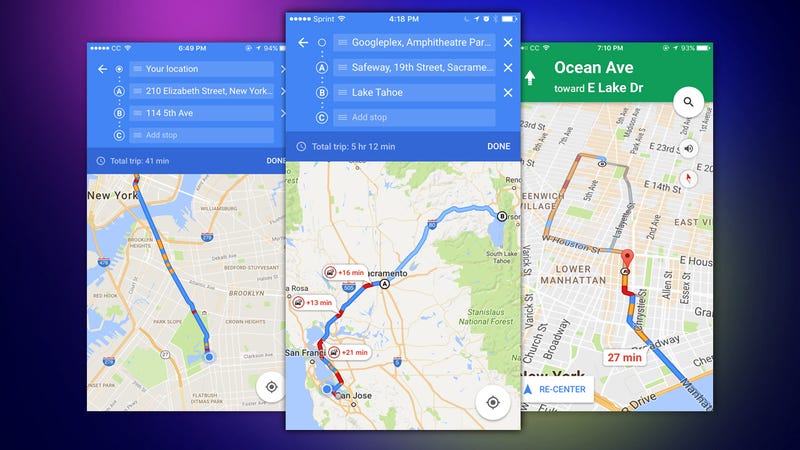
 Google Maps is adding a very useful feature to iOS today: the ability to add multiple stops to a single trip. Rather than only directing you from point A to point B, Maps can now bring you from point B to point C, D, E, and so on, making it much easier to plan a trip if you intend to bounce around and make occasional pitstops.
This feature has been available on the web for a while now, and it launched on Android a month ago today. Bringing the feature to mobile makes it all around more useful, as it'll make it easier to use Maps as a GPS replacement while in the car. Google also rolled out a design update to Maps this week.
Google may have fixed one of the biggest problems with its Maps app on iOS. The search giant has rolled out an update to its Google Maps app on Apple's iOSplatform. The update has finally brought the much-needed multiple-stop support to the app.
                                   

Thanks to the update, Google Maps on iOS now provides the users the ability to add multiple stops on a single trip. Interestingly, the feature has been available on the web version of Maps for quite some time. Support for multiple stops was rolled to the Maps app on Android recently, and now iOS users can enjoy it as well.

Using the multiple stops feature is easy. After the Maps app is opened, users first need to enter the destination location. Once this is done, the options can be tapped to access the 'Add stop' item. This is where multiple stops can be added. Not just that, it's also possible to re-arrange the order of the stops. All that needs to be done is dragging-and-dropping the stops to the required position. After everything is set, users can just tap Done and the multi-stop route is ready to be navigated.

The addition of multi-stop support in Google Maps is definitely a useful feature. It's bound to come in really handy when planning long trips that involve numerous stops in between.


Google recently updated its Maps app with a cleaner and more user-friendly appearance. As part of the update, it also removed topography and road outlines, while bringing in more points of interest like train stations and other spots.
New areas of interest are now highlighted with new shades to depict different districts. "The world is full of information, which means highlighting necessary info on the map without overcrowding it is a balancing act. So as part of this update, we've removed elements that aren't absolutely required (like road outlines). The result is a cleaner look that makes it easier to see helpful and actionable information like traffic and transit," remarked the tech giant.


Other than this, Google also brought Wi-Fi only mode to its search app recently. The Wi-Fi only mode can be activated via a toggle in the app's settings. The update also saw the introduction of notifications related to mass-transit delays.